What is OCR invoice processing?
OCR invoice processing uses optical character recognition to capture an invoice's data automatically, instead of a person typing it in. It scans the document, reads the characters, identifies the total, tax, dates and line items, and hands that structured data to your AP workflow.
Modern OCR is rarely just character reading. It is combined with machine learning so it can cope with different layouts, fonts, and poor-quality scans, and increasingly with AI that validates the fields and routes the exceptions. That combination is what separates a basic scanner from a real invoice-processing engine.
How OCR invoice processing works, step by step
Whatever the tool, the pipeline is the same five stages, from an invoice landing in an inbox to data posted in your ledger.
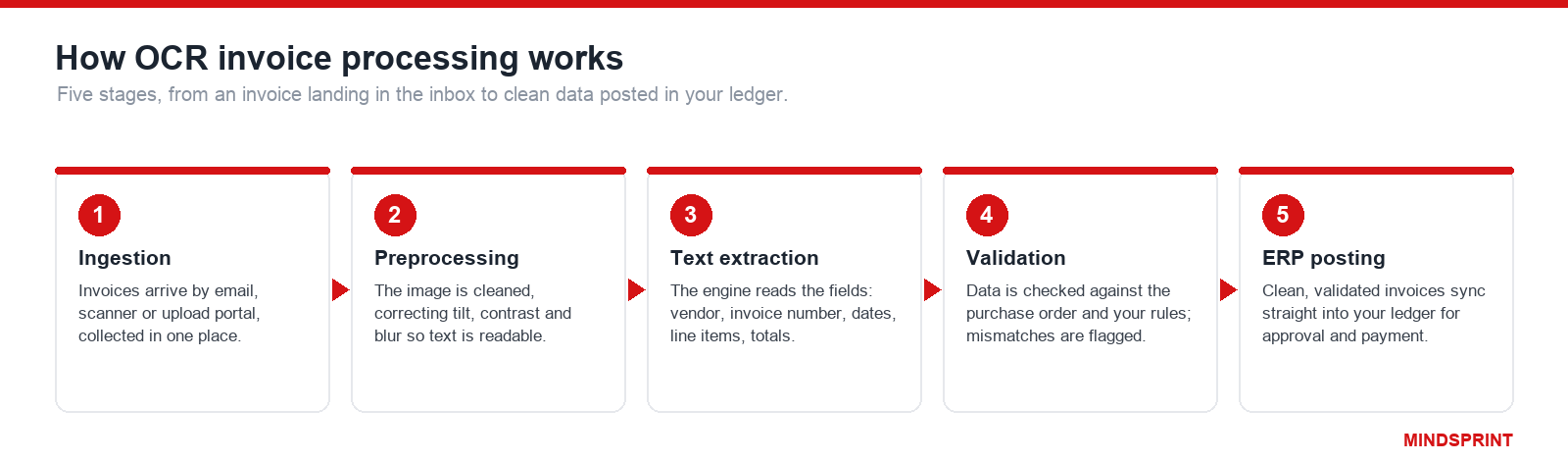
Ingestion. Invoices arrive by email, scanner, or an upload portal and are collected in one place.
Preprocessing. The software cleans each image, correcting tilt, contrast, and blur so the text is readable.
Text extraction. The system reads the characters and identifies the key fields, the vendor, invoice number, dates, line items, tax, and totals, using context to tell them apart.
Validation. The extracted data is checked against the purchase order and your business rules, and anything that does not match is flagged.
ERP posting. Clean, validated invoices sync straight into your financial ledger for approval and payment.
What data does OCR extract from an invoice?
A good OCR engine captures both the header and the line-item detail, so the invoice can be matched and posted without rekeying:
Vendor details: name, address, and tax or registration number.
Invoice metadata: invoice number, invoice date, and due date.
References: the purchase order number and any contract or account reference.
Line items: description, quantity, unit price, and line total for each row.
Financials: subtotal, tax, freight or other charges, and the invoice total.
Payment terms: the terms, currency, and bank or remittance details.
The benefits of OCR invoice processing
Eliminates manual data entry. The single biggest source of AP effort and typos disappears when the data is captured automatically.
Reduces errors and duplicate payments. Automatic capture and validation stop the wrong amount, the wrong vendor, or the same invoice being paid twice.
Speeds up the cycle. Teams cut invoice cycle time sharply, from an average of about 9.2 days by hand to roughly 3.1 days with OCR (Tipalti), which also protects early-payment discounts.
Creates a searchable audit trail. Every invoice becomes a digital, searchable record, which makes month-end close and audits far easier.
Scales without headcount. Once capture is automated, volume can grow without adding AP clerks in proportion.
How accurate is OCR invoice processing?
This is the section vendors gloss over, and the one that decides whether automation actually saves your team time.
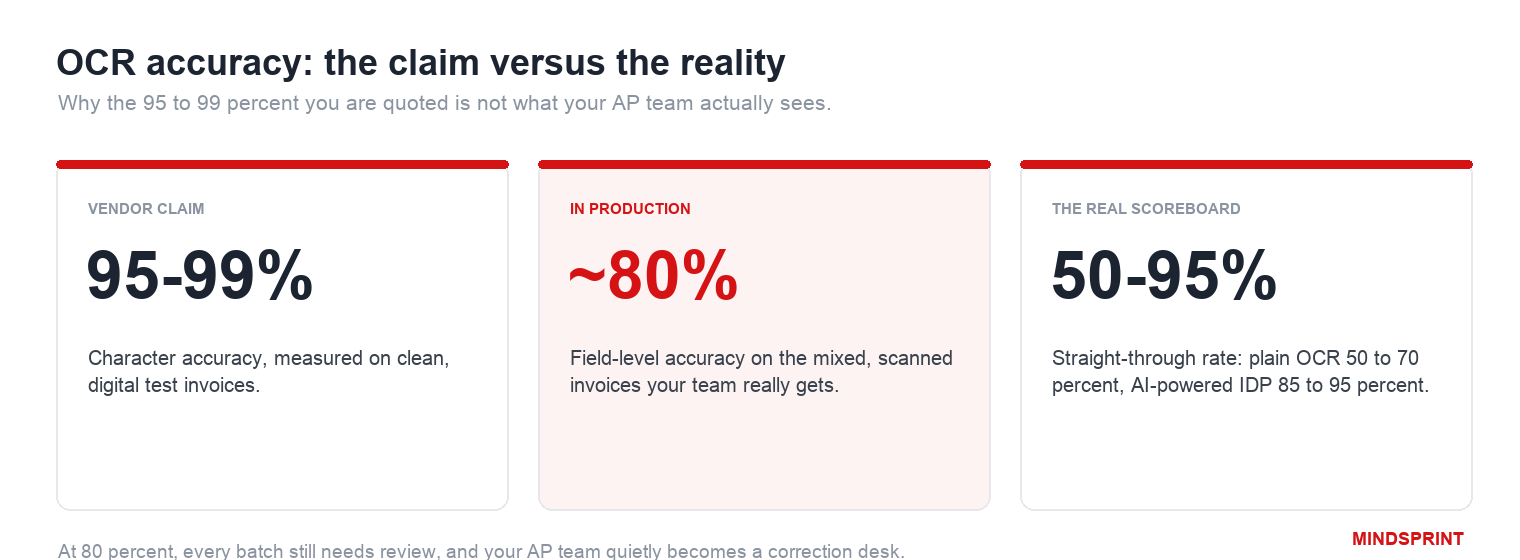
Vendors typically quote 95 to 99 percent accuracy. Those figures come from clean, digital invoices in a controlled test. On the mixed, scanned, and photographed documents most AP teams actually receive, production accuracy runs closer to 80 to 92 percent.
What matters is field-level accuracy, not character-level. A tool can read 99 percent of characters and still get the total wrong, because one misread digit fails the whole invoice. Field-level accuracy, whether the vendor, total and line items are all correct, decides how many invoices a human still touches.
That is why straight-through processing, the share of invoices that post with no human review, is the real scoreboard. Basic OCR lands around 50 to 70 percent. AI-powered IDP reaches 85 to 95 percent, even at tens of thousands of invoices a month.
The lesson from running this at scale: at 80 percent accuracy, every batch still needs review and your AP team quietly becomes an error-correction team. The jump from useful to genuinely touchless is not about reading text better, it is about resolving the exceptions that accurate extraction alone cannot.
The accuracy vendors quote, and the one that matters
There are four kinds of accuracy, and vendors quote the flattering one. Character-level accuracy, the share of characters read correctly, is the oldest measure and the least useful, because one misread digit corrupts a whole total. What decides your workload is document-level accuracy: whether every field on the invoice is right.
The math is unforgiving. At 97 percent field-level accuracy across the fifteen or so fields on a typical invoice, about 36 percent of invoices still contain at least one error. That is the distance between the vendor demo and your month-end.
Where accuracy actually breaks: line items and bad scans
Accuracy is not one number. It varies by field and by document, and the parts you most need are the parts that fail.
Header fields (vendor, invoice number, total): 99 percent and up, simple, unique and predictably placed.
Line items and tables: 95 to 97 percent. Merged cells, wrapped descriptions and borderless tables make this the hard part, and header accuracy does not predict it.
Multi-page tables: the lowest of any category, because the structure runs across pages and extraction loses the thread.
By document type: clean digital PDFs about 96 percent, scanned invoices about 93 percent, handwriting or phone photos 80 to 90 percent (independent 2025 benchmarks).
This matters because line items are exactly what you need for three-way matching, GL coding and spend analysis. In independent tests, unit prices were the single field tools failed on most, even when they read the invoice total correctly. So ask any vendor for line-item and document-level accuracy on your own invoices, never just field accuracy on their samples.
The economics OCR pitches leave out
The pitch is always to save time. The number that decides whether it pays is cost per invoice, and the one that quietly eats the savings is the cost of an exception. Both are shown below.
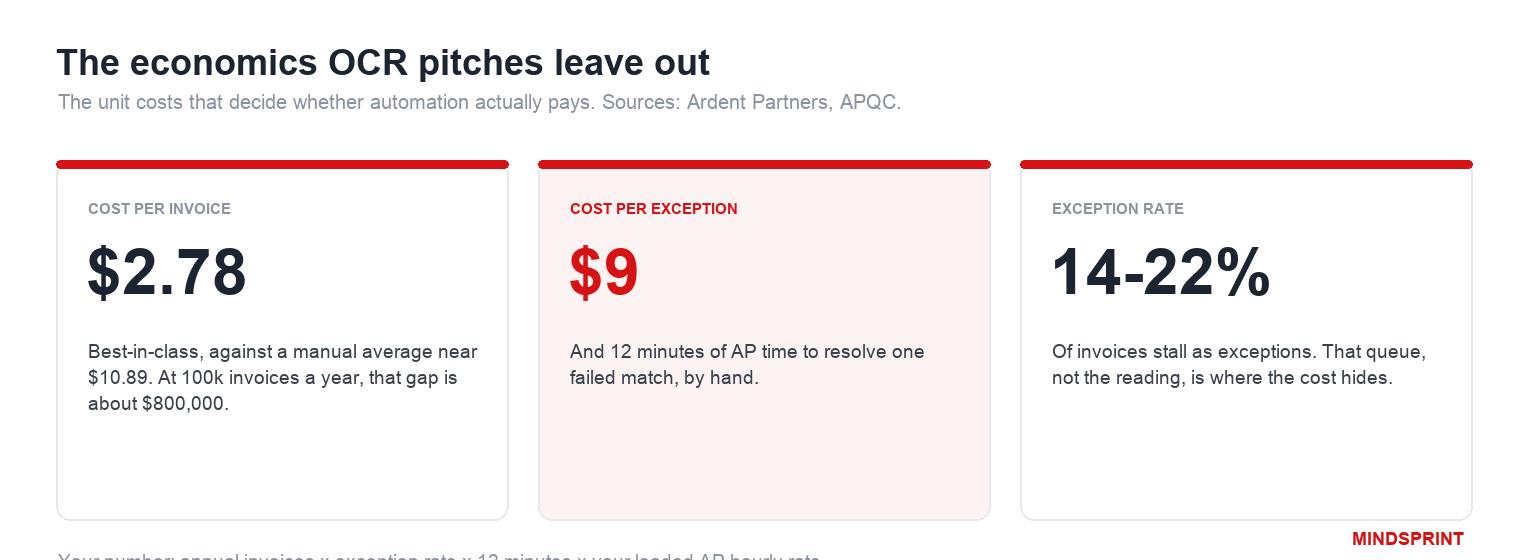
Processing an invoice by hand costs about $9 to $11 all in. Best-in-class automated teams do it for around $2.78, and the top quartile for under $2.10 (Ardent Partners, APQC). At 100,000 invoices a year, that gap is roughly $800,000.
But averages hide the exceptions. A failed match takes about 12 minutes and $9 of AP time to resolve, and 14 to 22 percent of invoices become exceptions. Cutting your exception rate from 35 to 20 percent on 12,000 invoices a year saves about $16,000 in labour alone.
A quick way to size your own number: annual invoices times your exception rate times 12 minutes times your loaded AP hourly rate. That figure, not the per-invoice price, is usually the real prize, and the one OCR quotes never mention.
Watch the costs the quote leaves out too: implementation, ERP connector work billed as professional services, template maintenance, overage charges, and reprocessing of failed pages. Downstream error correction alone can add a quarter to your processing cost.
Where OCR invoice processing falls short
OCR is excellent on clean, predictable invoices. The problems start with everything else, which in real accounts payable is a large share of the volume.
Non-standard formats. Every vendor lays out an invoice differently, and template-based OCR needs a template per layout, which becomes a maintenance burden as suppliers change.
Poor scans and handwriting. Faxes, mobile photos, handwritten notes, and multi-language invoices all drag accuracy down.
Complex and multi-page layouts. Nested tables, split line items, and summary pages confuse simple extraction.
Non-PO invoices. OCR may read a non-PO invoice perfectly and still leave a human to decide who approves it and which cost center it belongs to.
Exceptions pile up. Whatever OCR cannot resolve lands in a manual queue, and that queue, not the extraction, is where the cost and delay live.
Fix procurement before you buy more OCR
The most common mistake is treating a low touchless rate as an OCR problem when it is really a procurement problem.
The largest exception category is not misread text, it is non-PO invoices: bills with no purchase order to match against, so a human has to set the cost centre and the approver. In services-heavy or multi-country operations these can be 30 to 50 percent of invoices.
No OCR tool fixes that. Raising PO coverage and tightening supplier onboarding moves your touchless rate as much as better extraction does. If non-PO spend is above 30 percent, treat it as a governance gap to close first, and aim for under 15 percent of volume before you blame the technology.
Beyond OCR: AI, IDP, and agentic invoice processing
The 2026 answer to those limits is a stack, not a single tool.
AI-powered OCR replaces per-vendor templates with machine learning that reads any layout, pushing field accuracy toward 95 to 98 percent without template upkeep.
Intelligent document processing (IDP) adds a layer that understands the document, validates fields against the PO and your rules, and decides what is safe to post.
Agentic managed AP goes one step further: AI agents not only capture and validate but also work the exceptions, chasing a missing goods receipt, reading a credit memo, and proposing the fix, with your team on oversight.
This is where OCR stops being the whole solution and becomes the first stage of one. Mindsprint SprintAP runs the agentic layer across multiple ERPs and entities, for teams whose bottleneck is the exception queue, not the reading. It sits alongside your capture tools rather than replacing them.
When to move up a rung, from OCR to IDP to agentic
OCR is genuinely enough when you have a stable supplier base of roughly thirty vendors or fewer, predictable layouts, and only need header fields. Move up to IDP or agentic when any of these are true:
New invoice formats arrive faster than you can build templates.
You need line-item detail for matching, GL coding or spend analysis.
Your exception queue is measurable and growing.
Volume and format variety are scaling together.
You run multiple ERPs or entities and cross-system matching is still manual.
What to look for when choosing an OCR tool
Beyond the brand, five things decide whether a tool fits, and where the hidden costs sit.
Accuracy on your document mix. Ask for field-level accuracy on invoices like yours, not character accuracy on clean samples.
Scalability. Handling dozens of invoices a day is not the same as thousands; confirm it holds at your peak volume.
Integration. It has to post cleanly into your ERP, both ways, whether that is QuickBooks, Xero, NetSuite, SAP or Oracle.
Pricing, and the hidden parts. Watch for setup fees, per-page charges and enterprise quotes that escalate; cheaper SaaS tools often lack deep ERP integration.
Compliance. The audit trails and certifications your finance and audit teams need.
OCR invoice processing tools compared (2026)
There is no single best tool, only the best fit for your invoice volume, document mix, and ERP. The leading options, framed for accounts payable:
Tool | Best for | Accuracy and straight-through | ERP and integration | Pricing |
|---|---|---|---|---|
ABBYY (FineReader / Vantage) | Accuracy-critical, regulated industries | Very high on complex layouts; 190+ languages | Broad enterprise connectors | Custom, no public pricing |
Kofax (Tungsten) | Mid-market to enterprise workflow routing | Strong extraction plus validation and routing | Deep ERP and workflow integration | Custom pricing |
Rossum | Growing AP teams needing exception handling | Learns from corrections; 75 to 85% STP in enterprise AP | API and common ERPs | Custom pricing |
Nanonets | Unusual or varied invoice formats | Custom-trained models; high once trained | API-first, common integrations | Mid-tier, usage-based |
SAP (Document / Invoice Management) | Enterprises standardized on SAP | Audit-ready, tied to SAP data | Native SAP | Enterprise, costly |
SMB SaaS (Hubdoc, Dext, Lido) | Small business on QuickBooks or Xero | Good on clean invoices; light on exceptions | QuickBooks, Xero | Low, flat monthly |
Beyond these point tools sits the agentic managed model described above, which runs capture, validation, and exception handling as a service rather than software you operate yourself.
Small-business tools for QuickBooks and Xero
If you run QuickBooks or Xero at lower volume, the common picks are simpler and cheaper than the enterprise platforms above.
Hubdoc. Owned by Xero and free on most Xero plans; it fetches recurring bills and extracts receipt data.
Dext Prepare. Popular with QuickBooks and Xero users for strong line-item extraction; submit by email, mobile snap or portal.
Lido. Flat monthly pricing and template-free setup; good for low volumes, lighter on integrations.
Vic.ai. AI-driven and built for higher volumes; it predicts GL accounts and vendor coding on its own.
Which OCR setup fits your invoice volume and ERP?
The right choice depends on the three questions every AP buyer ends up answering: which ERP or accounting system you run, how many invoices you process a month, and whether your vendors are mostly domestic or international.
Small business, under about 1,000 invoices a month, on QuickBooks or Xero. A SaaS add-on such as Hubdoc, Dext, or a flat-fee tool is enough. Prioritize ease of setup and clean-invoice accuracy over deep integration.
Mid-market, thousands of invoices a month, on NetSuite or a growing SAP or Oracle footprint. Choose AI-powered IDP such as Rossum or Nanonets that learns from corrections and handles exceptions, and connect it to your ERP before go-live.
Enterprise, tens of thousands of invoices a month, multi-entity on SAP or Oracle, with international vendors. You need enterprise IDP (ABBYY, Kofax, SAP) plus a strategy for exceptions and cross-border tax and freight lines, and increasingly an agentic managed layer to reach touchless.
Security and compliance: what finance and audit will ask
Invoices carry bank details, tax IDs and personal data, and they leave your building the moment you send them to a capture tool. Finance and audit will gate the decision on a short list, so get ahead of it.
Certifications. Look for SOC 2 Type 2 and ISO 27001, not just a point-in-time Type 1.
A data processing agreement. Get the DPA before signing: how invoice data is used, retained and deleted.
Encryption and access. AES-256 in transit and at rest, role-based access, and tamper-evident audit logs of every change.
Data residency. Where documents are processed, cloud or on-premise, and in which region, matters under GDPR.
The human in the loop. Your review queue means people see invoice data; check who, where, and under what controls.
How to implement OCR invoice processing
Audit your current workflow first. Map how invoices arrive, where they stall, and what share are non-PO, before you choose any tool.
Choose AI-powered over template-based. Templates look cheaper but cost you in ongoing maintenance as vendors and layouts change.
Connect your ERP before going live, not after. The value is in straight-through posting, which only works when the integration is in place first.
Define exception ownership up front. Decide who resolves a failed match before you switch automation on, or the exceptions will simply pool.
Track field-level accuracy at 90 days, not at go-live. Real accuracy shows up once your full supplier mix has flowed through, so measure then and tune tolerances.
OCR is the first step, not the whole answer
OCR invoice processing is the right first move for any AP team still typing invoices by hand. It removes the data entry, cuts errors, and speeds up the cycle, and for clean invoices in a single accounting system it may be all you need.
The ceiling is accuracy on real documents and the exceptions OCR cannot resolve. That is where the numbers separate: plain OCR leaves you correcting most batches, while AI-powered IDP and an agentic layer take you to genuinely touchless processing.
So choose for where you are heading, not just where you are. Match the tool to your volume and ERP, insist on AI-powered extraction over templates, and plan for exceptions from day one. Then OCR is the front door to automation, not a faster way to do the same manual work.