The invoice workflow process, step by step
Before you can fix or automate an invoice workflow, you need the standard version clear in your head. Here is the full lifecycle in order: what each step does, who owns it, and the point where it tends to stall in real operations. Most tools automate the clean path well. The difference between them shows up in how they handle the messy 20 percent.
Step 1: Intake, data capture and coding
Invoices arrive in every format: PDFs by email, EDI feeds, supplier-portal uploads, scanned paper. A working process pulls all of them into one intake point and extracts the key fields automatically, vendor, invoice number, date, line items, tax and currency, then runs duplicate detection at entry. Same vendor and same invoice number already in the system, and it is flagged before it moves, which is where most overpayments are prevented in high-volume environments.
The invoice is also coded at this stage, to the general ledger (GL) account, cost centre and tax treatment, inherited from the purchase order where one exists and assigned by rule or AI where it does not. Owner: the AP clerk or the capture layer. Where it breaks: when intake is a shared inbox, there is no tracker, no owner, and no record of who saw what.
Step 2: Validation and matching (2-way, 3-way, or 4-way)
Matching is the control that confirms an invoice is real and correct before any money is committed. It compares the invoice against the purchase order and, for physical goods, the goods-receipt note. Which match you run depends on what you bought.
Match type | What it compares | When to use it |
|---|---|---|
2-way | Invoice vs purchase order | Services and spend with no goods receipt |
3-way | Invoice vs PO vs goods receipt | Physical goods, the standard for product purchases |
4-way | Invoice vs PO vs goods receipt vs inspection | Regulated or quality-critical goods needing sign-off |
When all documents agree within tolerance, the invoice moves on untouched, which is what drives a high touchless rate. Owner: the system, with procurement and receiving resolving genuine mismatches. Where it breaks: manual matching against spreadsheets, which turns a two-second check into a 20-minute one and scales badly past a few hundred invoices a month.
Step 3: Exception handling
Exceptions are normal, not failures. The design question is whether they stop everything or run on their own track. A mature process routes each exception type to the person who can actually resolve it, with an SLA timer on every open item so nothing sits silently.
Exception | Where it routes |
|---|---|
Price mismatch vs PO | Procurement contact who raised the PO |
Missing PO reference | Auto-request sent back to the supplier |
Quantity vs goods-receipt mismatch | Receiving team or warehouse manager |
Duplicate invoice detected | Held, AP manager notified immediately |
Vendor not in approved master | Vendor management team for onboarding |
Owner: the AP manager owns the exception queue; the resolution owners sit in procurement, receiving and vendor management. Where it breaks: treating every invoice identically, so one disputed invoice with a missing PO reference holds twenty clean ones behind it.
Step 4: Approval routing
Once an invoice clears matching, routing rules decide who approves it and in what order, by spend threshold, cost centre, supplier category, and entity in multi-entity groups. When an approver is out, delegation rules route to a substitute so the queue does not stop.
This is the single biggest source of delay in most AP operations, so it gets its own section in depth below. Owner: budget owners, and above their limit, the controller or finance director. Where it breaks: an undocumented approval matrix, so anything unclear defaults upward and the CFO ends up signing routine purchases.
Step 5: ERP posting and payment scheduling
Approved invoice data posts straight back to the ERP, whether SAP, Oracle, Microsoft Dynamics or NetSuite, with its coding intact, and payment is scheduled against vendor terms.
Discount-eligible invoices are flagged here and prioritised, so a 2 percent early-payment window does not close while the invoice waits. Owner: AP, with treasury on payment timing. Where it breaks: manual re-keying into the ERP, which quietly reintroduces the errors the earlier steps removed.
Step 6: Recordkeeping, reconciliation and archiving
Recordkeeping closes the loop. Every action logs automatically, who approved what, when, and with what comment, and the invoice, its approvals and its audit trail are stored together. When a review arrives months later, the full history is retrievable in seconds by invoice, vendor or date, not reconstructed from email threads. Owner: finance and the controller. Where it breaks: a fragmented trail spread across inboxes and folders, which turns audit readiness into a project every year.
The invoice workflow flowchart
The steps above look like a straight line, and for most invoices they are. Here is the standard flow:
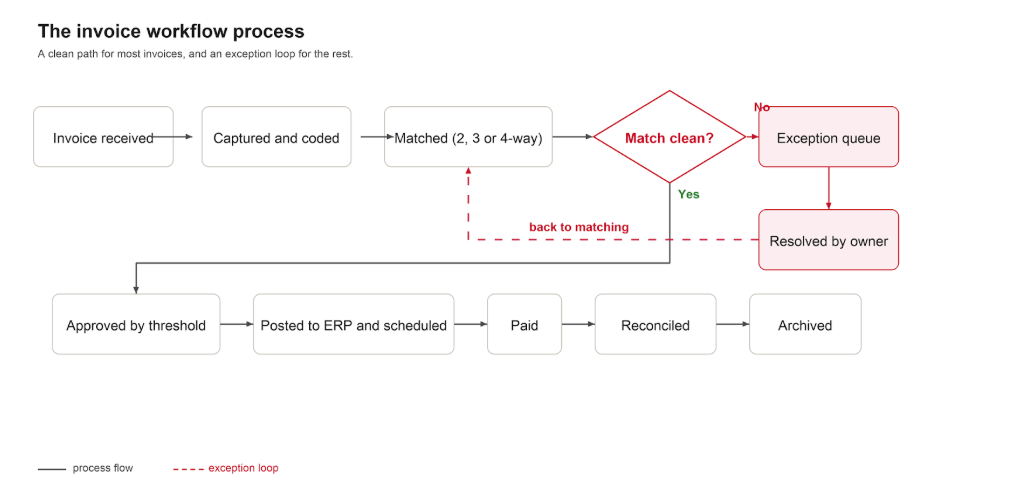
The one arrow the textbook diagram hides is that loop at the bottom. A real invoice workflow is not a straight line; it is a flow with a branch at matching and approval that sends the exceptions back around and holds them until an owner clears them. That branch is where the process actually lives, which is why the roles map and the four workflow types below matter more than the diagram itself.
Invoice workflow roles and responsibilities (who owns each step)
The reason invoice workflows stall is rarely the software. It is that no one is clearly accountable for a given step, so work waits in the gap between two people. This is the ownership map a working process makes explicit.
Step | Primary owner | Also involved | What fails if unowned |
|---|---|---|---|
Capture and coding | AP clerk / capture layer | Requester (non-PO coding) | Duplicates and mis-coded invoices slip through |
Matching | System, AP specialist on review | Procurement, receiving | Overbilling and price creep go unnoticed |
Exception resolution | AP manager (owns the queue) | Procurement, receiving, vendor mgmt | One exception stalls the whole batch |
Approval | Budget owner, then controller | Delegate when absent | Invoices default upward; CFO signs routine spend |
Payment and posting | AP, treasury on timing | ERP owner | Missed discounts and re-keying errors |
Audit and archiving | Controller / finance | Internal audit | Audit becomes a reconstruction project |
The named owners differ by company. What does not change is that every step needs one, and that the exception queue needs a single accountable owner. In a small business one person may hold several of these roles; in a multi-entity group each row can be a separate team, which is exactly why the handoffs have to be written down.
The four types of workflows (and why your invoice process is really a hybrid)
A common question when teams map this out is which type of workflow an invoice process is. There are four standard types, and the useful answer is that an invoice workflow is a blend of three of them.
Sequential. Steps run in a fixed order, each waiting on the one before. The clean invoice path is sequential: capture, match, approve, pay.
State-machine. The item moves between defined states and can go backward or sideways on an event. The moment an invoice hits an exception, it becomes a state machine, moving from in-review to on-hold or vendor-query and back again.
Rules-driven. Branching is decided by data and thresholds. AP approval is rules-driven: under a spend limit it auto-routes, over it, it escalates.
Parallel. Steps run at the same time. At scale, matching and duplicate-checking run in parallel, and multi-approver sign-off can too.
So an invoice workflow is a sequential backbone that turns into a state machine the instant an exception appears, governed by rules-driven approval thresholds. This is not academic. Most broken AP processes were designed as a straight sequential line, and then reality, the exceptions, the absent approver, the missing PO, behaves like a state machine the design never planned for. Fixing the workflow usually means designing for the state machine, not the happy path.
Where the invoice workflow process breaks down
Most teams do not go looking for a workflow diagram when things are calm. They look when approvals stall as volume spikes, when coding drifts from one person to the next, or when an invoice vanishes the moment it leaves AP's hands. So if the process is this well understood, why does it still slip? Not because the AP team is slow. Because the workflow was never designed to scale, to handle an absent approver, or to route exceptions separately from clean invoices. Four failure modes cause most of it.
No one designed the inbox to be a workflow
The shared AP inbox became a routing system by accident. When an invoice is forwarded manually, there is no tracker, no escalation, and no record of who saw it. One approver goes on leave and the batch sits. The supplier follows up two weeks later. By then the early-payment discount has expired and someone in finance is doing an urgent reconciliation that should never have been needed.
Manual matching takes hours your team does not have
At 400 invoices a month, each requiring a manual PO lookup and line comparison, AP staff spend a large part of their week on a task a system should handle in seconds. A price discrepancy that takes 20 minutes to find in a spreadsheet is flagged automatically in an automated match. That time difference compounds across hundreds of invoices every month.
Nobody can find the approval matrix
Ask most finance teams for a current, enforced approval hierarchy and the answer is a spreadsheet from 18 months ago. When someone is unsure who should approve a specific invoice type, it goes upward by default, and the CFO ends up signing routine purchases. That bottleneck at the top is not a leadership problem. The routing rules were never formalised anywhere.
One exception stops twenty clean invoices
Manual processes treat every invoice identically regardless of status. A disputed invoice with a missing PO reference holds the entire queue. A workflow designed for the state machine routes that exception to its own resolution track immediately, so the clean invoices never wait for it.
The real number: manual AP costs $10 to $40 per invoice depending on complexity; automated teams bring it below $3. At 5,000 invoices a month the difference is significant. Small companies take an average of 15 days to pay, enterprises 20 days, and both drop sharply when the workflow is designed correctly. Verify against your own baseline before publishing. Source: Stampli and Treasury Webinars AP benchmarks.
The invoice approval workflow: routing, thresholds and controls
Approval is the stage where most invoice workflows lose their days, so it is worth designing on its own. The invoice approval workflow is the routing-and-sign-off segment of the process: once an invoice is validated and matched, who authorises payment, in what order, and under what controls. Four things make it work.
Route by spend threshold, not by default
Approvers should be assigned to value bands and cost centres, so routine spend clears at the level that owns the budget and only genuinely large or unusual invoices climb higher. A workable starting matrix, tuned to your own delegation-of-authority policy, looks like this.
Spend band | Approver |
|---|---|
Under $1,000 | Department or budget owner |
$1,000 to $10,000 | Budget owner and finance manager |
$10,000 to $50,000 | Add the controller |
Above $50,000 | Add the CFO or finance director |
Delegate for absent approvers automatically
The single most common cause of a stalled queue is an approver on leave. Delegation rules should route to a named substitute the moment an item sits past its threshold, with an escalation timer behind it, so no invoice waits on one person's inbox.
Keep segregation of duties intact
The person who approves an invoice should not also be able to create the vendor or release the payment. Building segregation of duties and a complete approval trail into the routing, rather than bolting it on before an audit, is what keeps the workflow both fast and controlled.
Design for speed and control together
The instinct is to trade one for the other. In practice, mobile approval with reminders and escalation timers removes the waiting, which is where the days go, without loosening a single control. Speed comes from removing dead time, not from removing checks.
How AI and agentic automation change the invoice workflow
Rules-based automation fixed the mechanical parts of this process years ago. It could route by threshold, match against a purchase order, and post to the ERP. What it could never do was handle judgment: the non-PO invoice with no code to copy, the layout it had never seen, the exception that needed a decision rather than a rule. That is the part artificial intelligence, and now agentic automation, actually changes. Here is where it moves the needle, stage by stage.
Capture and extraction. Template-based OCR needed a setup for every vendor layout and broke when a new one arrived. AI reads any format, scanned or electronic, and pulls vendor, invoice number, dates, line items and tax from documents it has never seen. That is what lifts the straight-through rate. Test the accuracy on your own worst invoices, not a clean sample.
Data capture and coding. This is where AI earns its place. It learns from history how similar invoices were coded and suggests the GL account, cost centre and project code, including for the non-PO spend that rules could never handle. Because coding is where manual processes stall, automating it well is what unlocks the rest of the flow.
Routing and approval. Instead of a fixed rules table, AI-assisted routing learns who actually approves which invoices and sends them there, then reminds and escalates when they sit unactioned. The queue stops depending on one person's memory.
Exception handling. AI flags the unusual amount, the missing field or the mismatch early, before posting, so the exception is caught where it is cheapest to fix rather than after the payment has left.
The agentic leap. The newest shift is from AI that suggests to agents that act. An agentic layer does not just recommend a code or flag an exception; it works the state machine, chases the missing PO, re-routes the stalled approval, clears the routine exception, and hands a person only what genuinely needs a human decision. This is the model Mindsprint SprintAP runs on, delivered as a managed service for complex, multi-entity operations.
One honest caveat, and it is the same one every serious team learns: AI is only as good as the data and the guardrails behind it. Clean vendor records, clear coding rules and a documented approval matrix matter more once you automate, not less, because the system now applies them at scale. Introduce the intelligence on top of a process you have already mapped and it compounds. Bolt it onto a messy one, and it just makes the mess faster.
Benefits of an automated invoice workflow process
The cost reduction is real. But the operational shifts below it are where the lasting gains show up.
Approval time drops from weeks to hours
Ardent Partners benchmarks put average invoice approval time in manual AP environments at 10 to 14 days. Teams running well-designed automated workflows bring this below 3 days consistently. The difference is not raw technology speed. It is removing the time invoices spend waiting in inboxes, sitting untracked because the approver is out, or paused because nobody knows whose queue they belong in.
Errors get caught at step two, not step six
Duplicates are flagged at capture, price mismatches surface at matching. The correction cost at step two is near zero. The correction cost after payment has gone out involves finance, procurement, the vendor, and sometimes a formal dispute. Automation does not eliminate errors; it moves the catch point to where resolving them is cheapest.
Finance can see payables in real time
Manual AP gives finance a view of what was paid, usually days after the fact. Automated AP gives a live view of what is in the queue, pending approval, scheduled, or stuck in exception. That visibility changes how working-capital decisions are made and how accurately near-term cash positions can be forecast.
Early-payment discounts stop being theoretical
Most AP teams on manual processes know early-payment discounts exist and also know they rarely capture them, because the invoice is still in matching when the deadline passes. A workflow that flags discount-eligible invoices at capture and pushes them through faster often recovers, in captured discounts alone, a meaningful part of the automation cost.
Audit readiness stops being a project
Segregation of duties, approval controls and audit trails become part of how the workflow runs, not something assembled before an audit. The full approval history for any invoice is retrievable on demand, and the AP team reconstructs nothing.
What this looks like in practice: a global food and agri conglomerate running a touchless, agentic AP automation platform cut invoice cycle time by more than 70 percent, halved operational cost, and reached 99 percent error-free transaction accuracy with 100 percent audit traceability. Those outcomes came from AI-powered document intelligence, intelligent 3-way matching, and configurable approval routing connected directly to the ERP.
Best practices to improve your invoice workflow
Automation executes. The decisions made before and around it are what determine whether the results show up on a dashboard or in daily operations.
Map what actually happens, not what the policy says
Most AP teams discover mid-implementation that their documented process and their real process differ. A new supplier follows a different path than a long-standing vendor; service invoices route differently from goods invoices. Spend two to three weeks mapping the actual current state before any configuration. The gaps between documented and real are exactly where the automation has to handle edge cases correctly.
Set exception tolerance before go-live
A 1 percent price variance might be acceptable on a high-value contract invoice and not on a low-value consumables order. These are policy decisions, not technical ones. Define tolerance thresholds by invoice category and spend level before implementation. Teams that skip this end up with overactive exception queues where the system flags clean invoices that should have passed.
Write the approval matrix before opening the system
AP platforms ask who approves what. If the answer is not written down, implementation stalls while stakeholders argue about approval authority. Document spend thresholds, department ownership, escalation paths and delegate rules, and get sign-off before configuration begins.
Vendor data quality determines matching quality
Invoices fail matching most often because vendor records in the ERP are incomplete: a GSTIN that does not match, outdated bank details, payment terms that differ between the contract, the PO and the vendor master. Upstream vendor-data quality feeds directly into downstream matching accuracy. When vendor onboarding is managed properly at the source, through a source-to-pay platform like Procuresprint, exception rates in AP drop from day one.
Give exceptions their own SLA
Most teams handle exceptions last, yet exception invoices often carry the highest value or the most supplier-relationship risk. Set explicit SLAs by exception type, 48 hours for price mismatches, 24 hours for missing PO references, and track resolution time by category. When the same vendor generates the same exception repeatedly, that is a source problem to fix, not a routine invoice to resolve again each month.
Measure by exception type, not overall average
An average cycle time of 4 days could mean 80 percent of invoices clear in a day and 20 percent take three weeks. Track separately: time in the exception queue, approval turnaround per department, duplicate-detection rate, and touchless percentage. Those point to what to fix next. The average just confirms something is wrong.
Invoice workflow benchmarks: manual vs automated
These are not aspirational targets. They reflect what AP teams running properly designed automated workflows achieve consistently. Baseline your own numbers first, then watch them move.
Metric | Manual AP | Automated AP |
|---|---|---|
Invoice cycle time | 10 to 20 days | Under 3 days |
Touchless processing rate | Under 20% | Above 70% |
Exception rate | 25 to 35% | Below 15% |
Cost per invoice | $10 to $40 | Under $3 |
Discount capture rate | Under 30% | Above 90% |
Audit trail retrieval | Hours to days | Under 30 seconds |
How to automate your invoice workflow process
Start with invoice capture and 3-way matching. Those two steps together remove the highest volume of repetitive manual work and give immediate visibility into exception patterns that were previously invisible. Once matching is stable, build tiered approval routing on top, then connect payment scheduling. Each layer compounds the one before it.
If your team is working through what this looks like in your ERP environment, Mindsprint SprintAP is an agentic AP automation platform built for exactly this kind of phased deployment. It covers the downstream workflow from AI-powered invoice capture through intelligent matching, configurable approvals and direct ERP integration, and it is delivered as a managed service, which is the honest fit: it is built for complex, multi-entity operations rather than a self-serve small-business tool, and it integrates with payment rails rather than owning payments.
Implementation typically runs in 6 to 8 weeks with a 30, 60 and 90-day outcome framework. For teams that want to extend upstream into vendor onboarding, sourcing and contract management, Procuresprint connects the source-to-pay journey end to end.