Accounts Payable Process: Complete Step-by-Step Guide, Workflow and Best Practices 2026

Understand the accounts payable process from start to finish. All 8 steps explained, common failures at each stage, 2026 benchmarks, best practices, and how modern AP automation changes the equation.

Mihir Labh
Mihir Labh
Product Marketing Manager, Mindsprint
Published
June 17, 2026
Read time
4 mins
Updated
June 17, 2026

Most finance teams know what accounts payable does. Fewer have a clear picture of what it is actually supposed to do at each step, why it breaks down where it does, and what a well-designed process looks like versus a makeshift one. This guide covers all of it.

TL;DR

  • The accounts payable process is the 8-step workflow from purchase order to reconciliation that gets the right supplier paid the right amount on time, with a full audit trail.

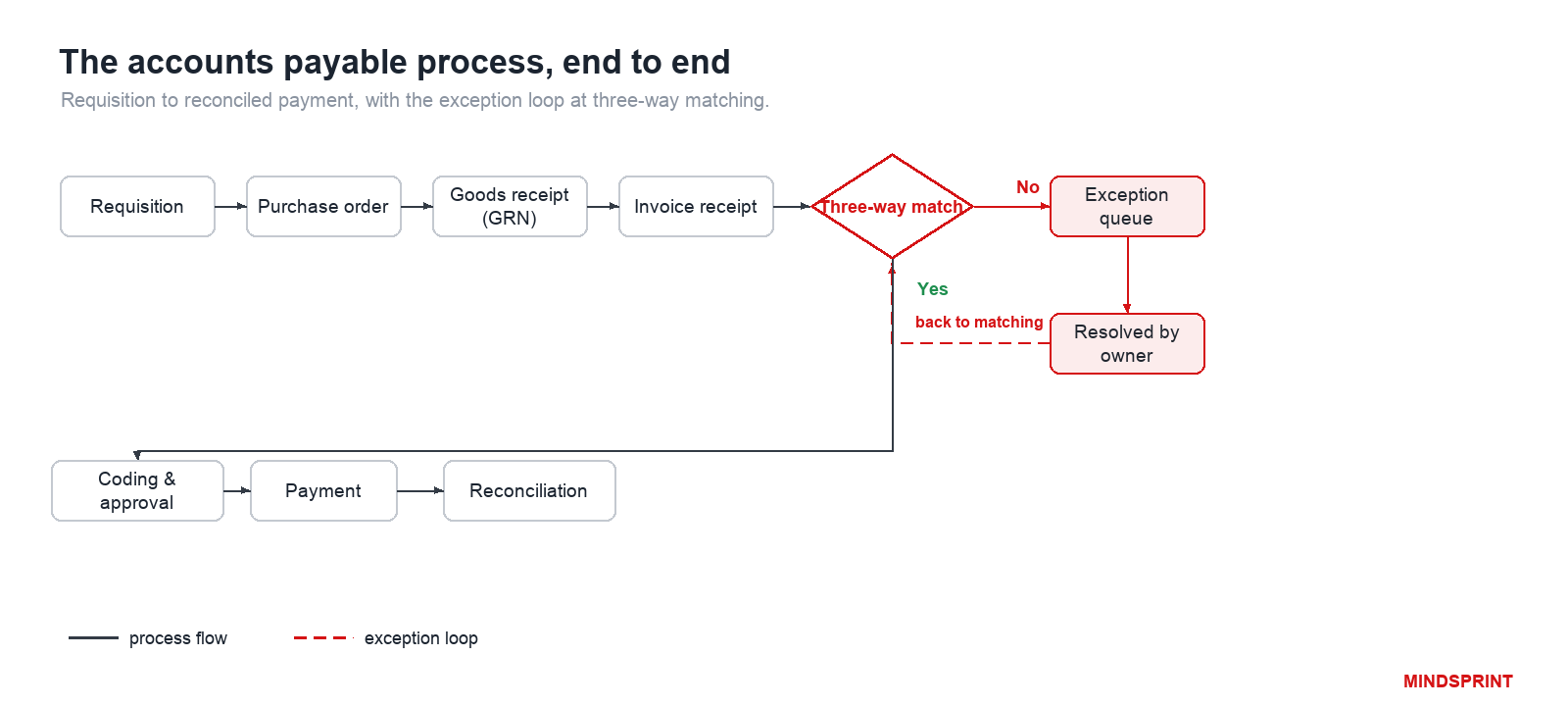
  • The 8 steps: PO issued, goods received (GRN), invoice captured, invoice matched (2 or 3-way), GL-coded and approved, payment executed, posted to the ledger, and AP ledger reconciled.

  • Most AP failures happen between steps, not inside them: approvals stuck in inboxes, exceptions with no owner, and the same invoice paid twice across entities.

  • Manual AP averages 14.6 days and $12 to $15 per invoice. Best-in-class teams run under 3.5 days at under $3, with 70%+ touchless and 95%+ on-time payment.

  • The fix is design plus automation: clean vendor master data, clear exception owners, and approval routing with escalation, before you automate matching.


In this article

    SprintAP

    Invoice Processing Automation

    Eliminate manual invoice handling, automate capture, coding, approvals, and posting while reducing errors and accelerating cycle times.

    Your Invoice Was Approved. So Why Did It Still Miss the Payment Run?

    The vendor sent the correct amount. The PO matched. The goods arrived on time. The invoice was approved by the right person. And somehow it still missed the payment run. Now the vendor is calling, you have spent 45 minutes reconstructing what happened, and the answer is a handoff gap nobody was watching.

    That is the nature of AP process failures in most organisations. The individual steps can be working fine. The data can be accurate. The approvals can be genuine. And the invoice still gets lost in transit between one step and the next because nobody specifically owns what happens in between. This guide explains every step in the process, what each one is supposed to deliver, and where the handoffs typically fail.

    What Is the Accounts Payable Process, and Why Does It Matter?

    The accounts payable (AP) process is the workflow a business uses to receive, validate, approve, and pay supplier invoices, then record every transaction in the general ledger. Its job: pay the right amount, to the right vendor, at the right time, with a complete audit trail.

    AP sits inside the procure-to-pay cycle: procurement raises the purchase order, operations receives the goods, AP handles the invoice through to payment. A breakdown at any point creates exception work that lands with the AP team.

    AP is not accounts receivable. AR manages money customers owe you. AP manages money you owe suppliers. Opposite directions, separate workflows.

    How the Accounts Payable Process Works: All 8 Steps Explained

    Each step in the AP cycle produces something the next step depends on. When a step delivers incomplete or inaccurate output, the problem does not stay contained. It moves forward and shows up as an exception, a delay, or a close-week surprise. Here is what each step is responsible for and where it commonly goes wrong.

    Sl. No.

    Step

    What it does

    Common failure point

    1

    Purchase Order Issued

    Locks in price, quantity, and terms before anything moves

    No PO raised — invoice arrives with nothing to match against

    2

    Goods or Services Received

    Confirms delivery via a goods receipt note (GRN) for 3-way matching

    GRN recorded late or not at all, blocking matching

    3

    Invoice Captured

    Converts the invoice into structured AP system data

    Manual entry errors: wrong codes, transposed amounts, duplicates

    4

    Invoice Validated and Matched

    Checks invoice against PO and GRN (2-way or 3-way)

    Exception flagged with no owner assigned to resolve it

    5

    GL Coded and Routed for Approval

    Assigns ledger codes and sends to the right approver

    Email-based routing with no escalation and no status visibility

    6

    Payment Scheduled and Executed

    Releases payment within agreed terms to capture discounts

    Approval delay causes invoice to miss early payment window

    7

    Payment Posted to General Ledger

    Records the transaction and closes the AP cycle for that invoice

    Batch ERP sync: payment not visible until next morning

    8

    AP Ledger Reconciled

    Aligns AP ledger with GL, bank, and supplier statements

    Treated as a year-end task — months of errors compound quietly

    Step 1: Purchase Order Issued

    A purchase order locks in the terms before anything moves: what is being bought, at what price, in what quantity, on what payment conditions. The PO number given to the supplier becomes the reference point for everything that follows.

    Skip this step and the downstream consequences compound quickly. Invoices arrive with nothing to match against, prices cannot be verified, and what started as an informal verbal agreement sits in dispute for weeks.

    Step 2: Goods or Services Received and Confirmed

    When delivery happens, the receiving team confirms what actually arrived against the original PO. This confirmation, usually called a goods receipt note (GRN), is the second document in a three-way match. Without it, matching cannot proceed.

    GRNs are one of the most commonly delayed steps. Receiving teams are busy, documentation gets recorded hours or days later, and for services there is no physical delivery to inspect. 

    The result: invoices sit waiting for a confirmation that nobody has formally issued.

    Step 3: Invoice Received and Captured

    Invoices arrive through email, supplier portals, EDI (Electronic Data Interchange), and sometimes still by post. The capture step converts that invoice into structured data inside the AP system. Whatever goes wrong here propagates through every step that follows.

    Manual keying carries a global error rate of around 39%. A single uncaught error at capture can block matching, misdirect the approval, or trigger a payment to the wrong account. The most common culprits:

    • Wrong vendor code or duplicate vendor record

    • Transposed amount or incorrect tax figure

    • Missing PO reference, making three-way matching impossible

    • Same invoice submitted via two channels, both entering the queue

    Step 4: Invoice Validated and Matched

    Validation confirms the invoice is complete and mathematically correct. Matching goes further: it compares the invoice against the purchase order and the goods receipt note to verify you are being charged for exactly what was ordered and received.

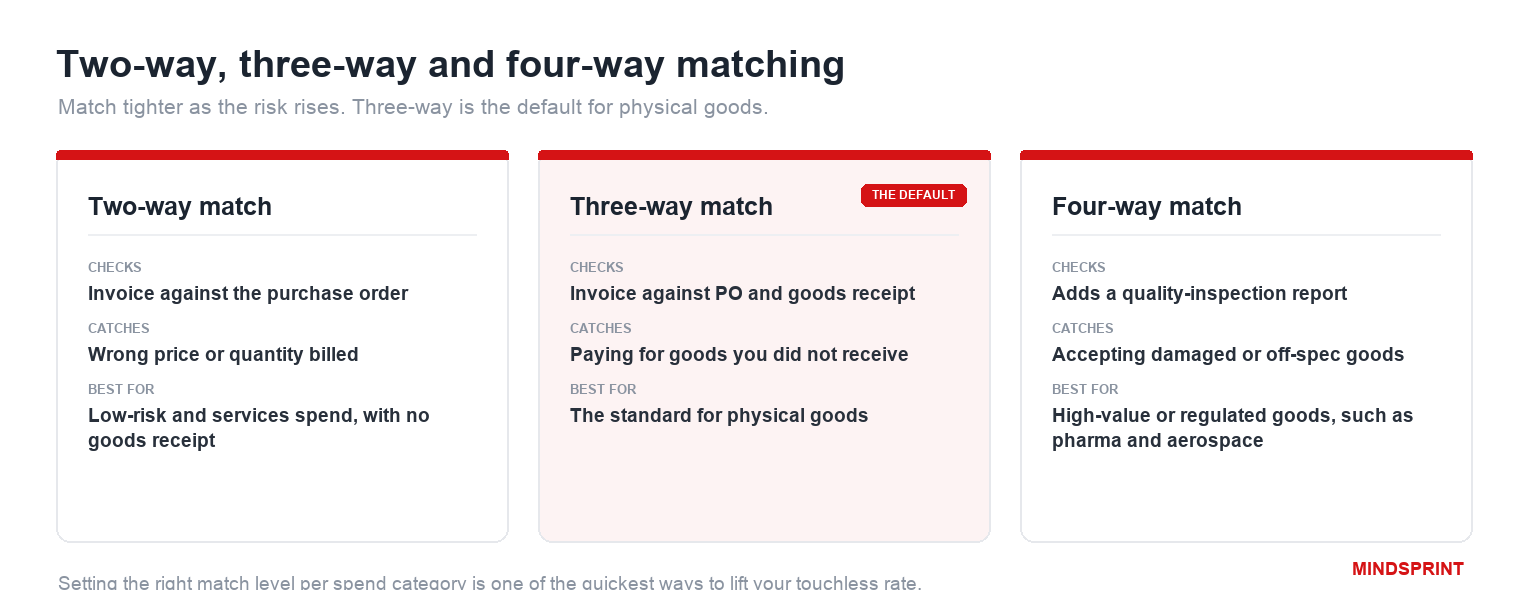
    Two types of matching are used depending on the purchase:

    • Three-way match: PO + GRN + invoice. Used for physical goods. All three documents must align within defined tolerance thresholds before the invoice proceeds.

    • Two-way match: PO + invoice only. Used for services and subscriptions where no physical delivery confirmation exists.

    Matching is where most AP cycle delays originate. In 2026, around 30% of AP teams still cite it as their primary bottleneck. The problem is almost never the matching logic. It is what happens when a mismatch is flagged: the exception sits because no specific person was assigned to resolve it and no response time was agreed.

    Step 5: GL Coded and Routed for Approval

    GL coding assigns each invoice to the correct ledger account, cost centre, and department. PO-backed invoices often inherit their codes automatically from the original purchase order. Non-PO invoices need someone to make that assignment manually, and when multiple people do it without a shared coding standard, the same expense ends up across different accounts depending on who processed it that day.

    Approval routing is where most organisations have a structural gap. Invoices get emailed to approvers. Email is not a workflow. It is an inbox with no SLA, no status visibility, and no escalation path. A proper routing system sends invoices to the right approver automatically, reminds them if there is no response, escalates to a backup after a set number of hours, and gives the AP team a live view of every pending invoice without anyone having to chase.

    Step 6: Payment Scheduled and Executed

    With approval confirmed, the invoice is scheduled within the agreed payment terms. Timing matters here more than most teams appreciate. A 2% early payment discount on a $50M payables base is $1 million in annual savings. Most organisations capture under 30% of available discounts, not because anyone decided to forgo them, but because the invoice spent too long in the approval queue and the discount window had already closed by the time payment was scheduled.

    Step 7: Payment Posted to the General Ledger

    When payment is released, the GL entry closes the AP cycle for that invoice: the accounts payable liability decreases, cash decreases by the same amount, and the transaction becomes visible in reporting. With a real-time API integration this happens immediately. With a batch sync, Tuesday payments may not appear in the GL until Wednesday morning. That gap forces manual close adjustments that should not need to exist.

    Step 8: AP Ledger Reconciled

    Reconciliation aligns the AP ledger with the general ledger, bank statements, and supplier statements. It is the quality check that catches what earlier steps missed. How often you run it determines how much damage accumulates before you catch it.

    Running reconciliation monthly keeps discrepancies small and correctable. Running it only at year-end means months of small errors compound into adjustments that require restating prior-period reporting. Reconciling key vendor statements quarterly catches a separate category of problem:

    • Invoices the supplier sent that your team never received

    • Credits issued by the supplier but never applied to your account

    • Payment disputes that have been building quietly for months

    None of these surface until a vendor calls. Monthly reconciliation means you find them first.

    Why Is Your AP Process Still Slow? Two Root Causes Most Teams Miss

    AP problems tend to cluster into two distinct types, and the reason most improvement projects fail to deliver lasting results is that they target one while leaving the other completely intact.

    1. When individual steps produce bad outputs

    The first pattern is step-level failure. Data is captured incorrectly. An exception is raised with no owner assigned to resolve it. A goods receipt note is logged late or with the wrong quantities. GL codes are applied inconsistently by different team members across the same expense type.

    These failures are process design problems at the step level. The inputs to a step are incomplete, the rules are unclear, or nobody owns what happens when something does not match the expected pattern. The fix is also at the step level: clearer input requirements, validation rules that catch problems before they propagate, a named owner for every exception category, and an agreed resolution time. Automation helps here, but only after the rules are clear. Automating a step with an undefined exception handling path just moves the exception to a different queue faster.

    2. When the handoffs between steps break down

    The second pattern is flow-level failure. The invoice is captured correctly. It is matched correctly. It is approved by the right person. And then it disappears into the gap between approval and payment scheduling because nobody is watching that handoff.

    Approval bottlenecks with no escalation path. Exception queues with no resolution SLA. Batch ERP posting delays that force the close team to work from yesterday's data. The same invoice processed by two subsidiaries with no cross-entity deduplication. These are visibility problems, not data problems. The fix is structural: digital routing with escalation, real-time status tracking across every invoice in the system, and monthly reconciliation as a standard discipline rather than an emergency exercise.

    Correctly identifying which pattern you have determines which fix will work. Faster matching does not help if approval queues have no escalation. Better GL coding rules do not help if the problem is a batch posting delay. Both patterns often exist simultaneously, which is why AP improvement projects need to address the process end to end, not just at the steps that are easiest to automate.

    7 AP Process Best Practices That Actually Make a Difference

    These are practical actions that address the failure patterns above, ordered by where to start rather than by importance. The first three create the foundation the rest depend on.

    1. Map how the process actually runs, not how it is supposed to run

    Follow one invoice from the moment it arrives to the moment it is paid and reconciled. Document every person who touches it, every system it passes through, and every moment where it waits for something. Most organisations find that the actual process is meaningfully different from the documented one, and the gap between the two is where the most costly failures live. This exercise takes a few days and produces the factual baseline every subsequent improvement needs to be built on.

    2. Fix the vendor master before anything else

    Duplicate vendor records, unverified bank account details, and missing payment terms in the vendor master create downstream errors that no matching rule or approval workflow can reliably catch after the fact. A vendor that appears twice in the system with slightly different names is a duplicate payment waiting to happen. An unverified bank account change is a fraud vector. A vendor record without agreed payment terms forces manual decisions at the payment stage that should not need to be made.

    The fix is simple: a standard vendor intake checklist completed before any purchase order is raised for a new supplier, with a bank verification step built in. It eliminates an entire category of downstream exception at the source.

    3. Set PO thresholds by spend category, not a single number

    A single dollar threshold, everything above $2,000 requires a purchase order, sounds logical but creates a predictable problem: a large volume of non-PO invoices just below that number, submitted by suppliers who know the threshold exists. Category-based rules work better because they reflect the actual risk profile of different types of spend. Marketing and project spend may need a PO at $500. Recurring utility invoices may operate under a blanket order. The threshold should match the control need, not be a uniform number applied everywhere.

    4. Define exception owners before you implement any matching automation

    This is the step most AP automation projects skip, and it is the main reason they underdeliver. Matching automation flags exceptions. If those exceptions land in a generic queue with no named owner and no agreed response time, the automation has not improved cycle time at all. It has just moved the unresolved work from a manual queue to a digital one. Define each exception category, assign a default resolver, agree a resolution SLA, and make the queue visible to the team before turning on any automated matching rules. The automation will then actually reduce cycle time rather than simply reorganising the backlog.

    5. Build approval routing with escalation from day one

    Email is not approval routing. It is an inbox with no SLA, no audit trail, and no escalation mechanism. A properly designed approval workflow sends the invoice to the right approver based on amount, department, and vendor type, sends automatic reminders when there is no response, escalates to a backup approver after a defined number of hours, and gives the AP team a live view of every invoice and its current approval status without anyone having to chase anyone else. This single change reduces approval cycle time more than almost any other intervention.

    6. Run AP reconciliation every month, not at year-end

    Monthly reconciliation requires two to three days of focused work on a well-maintained process. Running it for the first time after six months of deferred exceptions can take a week and produces adjustments that affect prior-period reporting. Organisations that make monthly reconciliation a non-negotiable close discipline consistently close their books two to three days faster than those that treat it as a quarterly or annual task. The compounding benefit is that problems surface and get fixed within the same period they occurred, rather than being discovered during an audit months later.

    7. Track five KPIs, not twenty

    Invoice cycle time, cost per invoice, touchless processing rate, on-time payment rate, and exception rate. These five metrics together give a complete picture of whether the AP process is fast, efficient, automated, reliable, and clean. Adding more metrics does not improve visibility. It dilutes focus. When any one of these five deteriorates, that is the signal for where to investigate.

    Is Your AP Process Performing? 2026 Benchmarks to Find Out

    Best-in-class figures reflect organisations with well-designed, mature AP processes. Use them as a direction of travel. The gap between where most manual AP teams sit and where best-in-class teams operate is not primarily a technology gap. It is a process discipline gap.

    KPI

    Manual AP average

    Best-in-class 2026

    What it tells you

    Invoice cycle time

    14.6 days

    Under 3.5 days

    Days from invoice receipt to payment execution

    Cost per invoice

    $15 to $26

    Under $3

    Fully loaded cost to process one invoice end to end

    Touchless rate

    Below 30%

    Above 70%

    Invoices completed with zero manual intervention

    On-time payment

    Below 80%

    Above 95%

    Invoices paid within the agreed supplier terms

    Exception rate

    Above 25%

    Below 8%

    Invoices requiring manual exception handling

    Early payment discounts

    Below 30% captured

    Above 80% captured

    Available discounts actually taken

    What Does AP Automation Actually Fix, and What Does It Not?

    Automation does not replace the AP process. It removes the manual work from individual steps and creates the visibility between steps that prevents flow-level failures. But the specific gains vary significantly depending on which part of the process is being automated, and which type of automation is actually doing the work.

    Where the biggest cost reduction happens: Invoice capture

    The single highest-return automation in AP is intelligent invoice capture. AI reads invoices from any channel, in any format, including handwritten documents and non-English languages, and extracts the header and line-item data with accuracy above 99%. This eliminates the manual keying that drives both the cost per invoice and the global error rate. When the data enters the system correctly the first time, matching runs more cleanly, coding is more consistent, and the exception queue is smaller from the start.

    Matching and exception handling: the difference between automated and genuinely automated

    Automating the matching step is useful. Automating exception handling is transformative. Rule-based matching handles clean, PO-backed invoices in standard formats and routes everything else to a human queue. That is automation in the basic sense: the easy invoices are processed without anyone touching them. The hard ones, non-PO invoices, amount mismatches, multi-language documents, still land with the team.

    SprintAP’s Agentic AI goes further. Instead of flagging exceptions and waiting, it uses agents that investigate and resolve different exception categories without human input. An exception involving a non-PO invoice gets GL-coded from learned historical patterns for that vendor. An amount mismatch gets investigated against the contract and purchase order before being routed to the right person with a resolution recommendation. A vendor payment query gets answered in real time without the AP team being involved. The touchless rate improves not just at go-live but continuously, as the system learns from the specific vendor patterns of that organisation.

    Approval routing, ERP posting, and reconciliation

    Automated approval routing replaces email chains with a structured digital workflow. Invoices reach the right approver instantly, reminders send without anyone following up manually, and escalation happens automatically when there is no response. The AP team has a live view of every invoice in the system without sending a single follow-up email.

    Real-time ERP integration means the GL reflects the current position the moment a payment is released, not the following morning. Month-end close works from live data rather than from a batch that may be hours out of date. Monthly reconciliation, already simpler because the data is cleaner throughout the process, runs in two days instead of five.

    When Good AP Process Design Is Not Enough: What Changes at Scale

    Good AP process design works at a manageable scale. When invoice volumes grow significantly, supplier bases span multiple countries, and multi-entity structures create cross-entity duplicate risks, the manual version of even a well-designed process breaks down, not from poor execution, but because complexity exceeds what rules-based systems can handle.

    Rule-based platforms automate clean, standard invoices and route everything else to a human queue. As exception volumes grow, that queue grows too. The AP team ends up handling the same work automation was supposed to eliminate.

    Agentic AI platforms use specialist agents that resolve exception categories without human input:

    • Document Intelligence: reads any invoice format, language, or handwriting with near-perfect accuracy

    • AI Matching: learns vendor-specific patterns and resolves exceptions autonomously over time

    • Agentic Helpdesk: handles supplier payment queries in real time, without AP team involvement

    • Process Discovery: surfaces which exception categories recur and why, fixing root causes

    Mindsprint's SprintAP is built on this model. The Augmented Finance Operations service operates SprintAP on your behalf with committed milestones at 30, 60, and 90 days. Talk to the Mindsprint team to see what this looks like for your volumes.

    Share

    Frequently Asked Questions

    What is the accounts payable process?

    The end-to-end workflow a business uses to receive, validate, approve, pay, and record supplier invoices, ensuring the right amount reaches the right vendor at the right time with a complete audit trail.

    What are the 8 steps in the AP process?

    Purchase order issued, goods received and confirmed, invoice captured, invoice validated and matched, GL coded and routed for approval, payment scheduled and executed, payment posted to the general ledger, and AP ledger reconciled. Each step feeds the next, so a failure anywhere creates downstream work that compounds if not caught early.

    What is three-way matching in accounts payable?

    A payment control that compares three documents: the purchase order (what was ordered), the goods receipt note (what was received), and the supplier invoice (what is being charged). All three must agree within tolerance thresholds before the invoice can proceed to payment. When they do not, the mismatch is an exception that needs a named owner and a resolution timeline, not just a flag in the queue.

    What is the difference between rule-based AP automation and agentic AI?

    Rule-based automation processes standard invoices automatically and sends exceptions to a human queue. Agentic AI resolves those exceptions autonomously using specialist agents that learn from your vendor patterns, which is why rule-based touchless rates plateau while agentic ones keep improving.

    When is the right time to automate the AP process?

    After exception ownership is defined and approval routing rules are documented. Automating before those are clear just accelerates a broken process. Map the real workflow, assign exception owners, then automate the highest-volume manual steps first.

    Still have questions?

    Email us, and our AP automation experts will get back to you shortly.

    Email Icon
    Send Email

    What is the accounts payable process?

    The end-to-end workflow a business uses to receive, validate, approve, pay, and record supplier invoices, ensuring the right amount reaches the right vendor at the right time with a complete audit trail.

    What are the 8 steps in the AP process?

    Purchase order issued, goods received and confirmed, invoice captured, invoice validated and matched, GL coded and routed for approval, payment scheduled and executed, payment posted to the general ledger, and AP ledger reconciled. Each step feeds the next, so a failure anywhere creates downstream work that compounds if not caught early.

    What is three-way matching in accounts payable?

    A payment control that compares three documents: the purchase order (what was ordered), the goods receipt note (what was received), and the supplier invoice (what is being charged). All three must agree within tolerance thresholds before the invoice can proceed to payment. When they do not, the mismatch is an exception that needs a named owner and a resolution timeline, not just a flag in the queue.

    What is the difference between rule-based AP automation and agentic AI?

    Rule-based automation processes standard invoices automatically and sends exceptions to a human queue. Agentic AI resolves those exceptions autonomously using specialist agents that learn from your vendor patterns, which is why rule-based touchless rates plateau while agentic ones keep improving.

    When is the right time to automate the AP process?

    After exception ownership is defined and approval routing rules are documented. Automating before those are clear just accelerates a broken process. Map the real workflow, assign exception owners, then automate the highest-volume manual steps first.

    Book Demo

    See Sprint AP in action

    Walk through a live workflow — from invoice receipt to payment posting.

    Mindsprint exists to responsibly engineer the next generation of enterprises, driven by insight, innovation, and passion. With a proven track record spanning two decades, we are the partner of choice for high-impact, AI-driven technology solutions for clients across the globe in industries such as retail, agriculture, manufacturing, healthcare, and life sciences among others.
    Our offerings include enterprise technology applications, business process services, cybersecurity solutions, and automation-as-a-service, delivered with a strong commitment to responsible innovation.
    Headquartered in Singapore, Mindsprint has a global workforce of 3,200+ professionals across the US, UK, Middle East, India, Australia, and Africa.

    Choose your innovation pathway, be it digital transformation strategy, IT consulting services, intelligent enterprise operations, cybersecurity, or the latest technology trends. Let us start a conversation. Let our minds sprint towards true digital transformation

    Get in touch